
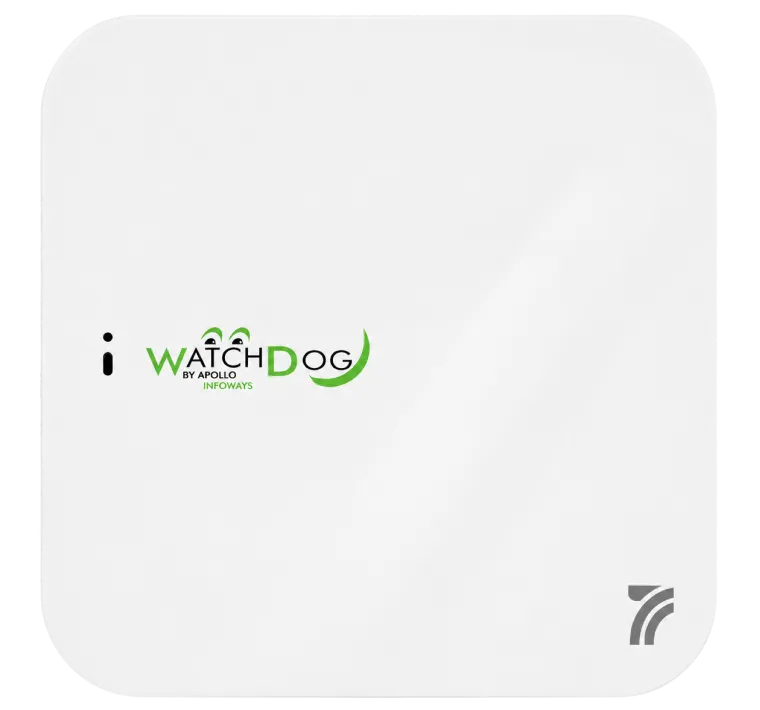
WD-AP1100
- Wi-Fi (802.11ax) Standards
- Ultra-Fast Speed
- PoE Support
- Flexible Deployment
- Enhanced Security
Key Features
Wi-Fi 6 AP with Powerful Capabilities
WD Wi-Fi 6 AP support three flexible AP modes, which can operate independently or work in collaboration with wireless controllers. They can be freely switched according to actual deployment needs, adapting to different network architectures. Meanwhile, they are paired with WD’s cloud-based deployment platform and WD-NMC on-premises deployment platform—both platforms are equipped with capabilities for intelligent automated management, AI- driven insights, and unified infrastructure management and control. Leveraging these two flexible deployment options, users can easily enable full-lifecycle management of Wi-Fi 6 APs, maximizing the efficiency of intelligent O&M (Operations and Maintenance). This thus ultimately meets the diverse application scenario needs of various enterprises.
Flexible Networking
WD Cloud-Based Deployment and ManagementWD Wi-Fi 6 series APs can work in cloud AP mode, and can also collaborate with wireless controllers (ACs). If combined with the WD cloud platform, enterprises can achieve unified monitoring and management of wired and wireless networks, and obtain an integrated operation and maintenance experience. The Cloud platform is equipped with an intuitive interactive Web interface and advanced, scalable management tools. It adopts a fully distributed architecture, enabling comprehensive management of network, terminal, user, and service activation functions.
WD NMC On-Premises Deployment and ManagementWD Wi-Fi 6 series APs can work in cloud AP mode, and can also collaborate with wireless controllers (ACs). If combined with the WD-NMC platform, enterprises can achieve unified monitoring and management of wired and wireless networks, and obtain an integrated operation and maintenance experience. The WD-NMC platform is equipped with an intuitive, user-friendly web interface, supports network control, and provides a unified view of the network topology while enabling policy-based network management.
Diverse Multi-Device Collaboration Modes for APsWD Wi-Fi 6 series APs support operation in FitAP mode and work in collaboration with wireless controllers, switches, routers and security products with embedded wireless controllers. This enables them to adapt to scenarios of different scales, simplify O&M (Operations and Maintenance) to reduce costs, enhance network performance and security, support flexible business expansion, and ultimately achieve on-demand deployment while protecting customers' early- stage investments.
Wi-Fi 6 (802.11ax) Standards
Orthogonal frequency division multiple access (OFDMA)802.11ax uses OFDMA to allow multiple users to transmit data simultaneously. OFDMA splits a channel into sub- channels, known as resource units (RUs), with specific subcarriers, and assigns RUs to different users for simultaneous transmission. OFDMA enables simultaneous multi-user transmission and reduces latency caused by channel contention.
DL/UL MU-MIMODL/UL MU-MIMO technology allows AP to send data to multiple stations simultaneously, breaking through the traditional wireless serial communication mechanism, increasing the utilization rate of wireless spectrum resources, and improving the number of effective access users and access experience under high-density deployment.
BSS coloringSpatial reuse allows the access points and their clients to differentiate between BSSs, assigns a different color per BSS to help access point identify co-channel interference and stop transmission in time. This optimizes frequency reuse and improves network capacity.
Target wake time (TWT)TWT improves power efficiency and reduces contention by increasing client sleep time and allowing negotiation of the times that clients can access the medium.
SOFTWARE SPECIFICATIONS
Product Capabilities
- Basic information - Indoor, dual-radio AP, 802.11a/b/g/n/ac/ac Wave 2/ax
- AP operating mode - Fit AP Mode, managed by Wireless LAN Controller
Cloud AP Mode, managed by WD Intelligent O&M platform Anchor
AP Mode, managed by Anchor AP
Note: AP Operating Modes can be switched via CLI, Wireless LAN Controller, WD intelligent platform, Reset button - Supported Wireless LAN Controllers - WD Wireless LAN Controllers
- Frequency and MIMO - Dual-radio mode
5GHz, 4×4:4, 4.8Gbps
2.4GHz, 4×4:4, 1.15Gbps
5GHz/2.4GHz, 1×1:1, Only for scanning - Compliance and bandwidth - 5GHz, 802.11a/n/ac/ax
20MHz/40MHz/80MHz/160MHz (Scanning radio does not support 160MHz)
2.4GHz, 802.11b/g/n/ax 20MHz/40MHz
- Maximum transmission speed - 5.95Gbps (4x4 160MHz on 5GHz, and 4x4 40MHz on 2.4GHz)
- Maximum number of clients - 1024 (512 on 5GHz, and 512 on 2.4GHz)
Note: the actual number of users varies according to the environment - Maximum number of BSSIDs for each radio - 16
802.11ax
- MU-MIMO - Uplink / Downlink Multi-user multiple-input multiple-output (MU-MIMO)
- OFDMA - Uplink / Downlink Orthogonal frequency division multiple access (OFDMA)
- TWT - Target Wake Time, allowing clients to sleep for a predetermined period of time and be awakened only when network communication is needed, effectively reducing the power consumption
- BSS coloring/SR - Spatial reuse, dividing different BSSs into different colors to avoid cofrequency interference and improve the user experience of wireless networks
WLAN Basics
- A-MPDU - Aggregated MAC Protocol Data Unit, improves data transmission efficiency by optimizing the composition of TX/RX directional data packets
- A-MSDU - Aggregated MAC Service Data Unit, improves data transmission efficiency by optimizing the composition of TX/RX directional data packets
- LDPC - Low-density Parity-Check, improves communication efficiency through error correction coding technology
- LACP - Link Aggregation Control Protocol, achieving bandwidth aggregation, redundancy backup, and load balancing, the APs require at least 2 ports
- STBC - Space-Time Block Coding, improves channel capacity through multi-antenna coding technology
- DFS - 802.11 Dynamic Frequency Selection, automatically identifies DFS frequency bands, adjusts device frequencies, and avoids interference with other devices
- TxBF -Transmit Beamforming, Improve the signal-to-noise ratio of wireless network signal transmission by adjusting the beam direction of antenna transmitting signals
- CCF - Cellular coexistence feature, use built-in software filtering to minimize the impact of interference from 3G/4G cellular networks
- MRC - Maximum-ratio combining, improve signal reception quality
- CDD/CSD - Cyclic Delay Diversity/Cyclic Shift Diversity, improve signal reception quality
Tunnel Management
- DTLS - Tunnel between AC and AP support DTLS encryption
- CAPWAP tunnel - Unicast/broadcast/DNS/DHCP/static IP method for discovering AC
- NAT - NAT between AC and AP
- IPv4/IPv6 - Tunnel between AC and AP support IPv4 and IPv6
- Time synchronization - Synchronizing clock information from AC
- Dual tunnel - Establishing CAPWAP tunnels with two ACs
- PPPOE - Support PPPOE Client
- IPsec - Cloud AP mode support IPsec
WLAN Extension
- SSID hiding - Restrict access and improve wireless network security by SSID hiding
- RF adjustment- Automatic channel/power/bandwidth adjustment
- Limit the number of connected users -User access count restriction based on SSID and RF
- Forwarding mode - Centralized forwarding/local forwarding/policy forwarding
- Local forwarding - Local forwarding based on SSID and VLAN
- VLAN binding - Binding VLAN based on interface/SSID/MAC
- User isolation - VLAN-based user isolation
SSID-based user isolation - Load balancing - Traffic-based load balancing
User-based load balancing
Frequency band-based load balancing, dual-5G devices only - Band steering - Improve service quality by prioritizing access to 5G frequency bands for wireless clients
- Roaming - 802.11k and 802.11v smart roaming
802.11r fast transition roaming - Multicast enhancement - IPv4/IPv6 MLD Snooping/IGMP Snooping Convert multicast data into unicast data for transmission, reducing network congestion
- Wireless location - Fit AP mode support BLE location
Fit AP mode support RSSI location - IoT - IoT expansion by connecting third-party RFID or Zigbee gateways through PSE port
- Mesh - Mesh link security
Mesh link
Multi-hop Mesh - Wireless probing - Monitor the wireless network environment by monitoring wireless network messages
- Hotspot 2.0 - Fit AP mode support Hotspot 2.0
User Authentication
- 802.1X authentication - Local and remote 802.1X authentication
- MAC authentication - Local and remote MAC authentication
- Portal authentication - Local and remote Portal authentication Guest/Captive portal Portal mac-trigger
- PSK - PSK and Private-PSK
- PPSK - Fit AP mode support Private Pre-Shared Key, obtain passwords to access wireless networks through the WD Intelligent O&M platform
- Social Media APPs Authentication - Cloud AP mode support Google/Facebook/Twitter through the WD Intelligent O&M platform
- Extensible Authentication Protocol (EAP) - EAP-Transport Layer Security (TLS) EAP-Tunneled TLS (TTLS) Microsoft Challenge Handshake Authentication Protocol (MSCHAP) v2 Protected EAP (PEAP) v0 or EAP-MSCHAP v2 EAP-Flexible Authentication via Secure Tunneling (EAP-FAST) PEAP v1 or EAP-Generic Token Card (GTC) EAP-Subscriber Identity Module (SIM)
Wireless Security
- Encryption - TKIP, CCMP
WPA2-Personal (802.11i)
WPA2-Enterprise with 802.1X
WPA3-Personal, WPA3 Enterprise
WPA3-Enhanced Open (OWE)
Advanced Encryption Standard (AES) - Forwarding security - Packet filtering
MAC address filtering
Broadcast storm suppression - IPSG - IP source guard (IPSG) prevents spoofing attacks by using an IPSG binding table to filter out illegitimate packets
- Wireless EAD - Coupled with EAD (End user Admission Domination) solution, implement security policies for terminals accessing the network to improve wireless network security
- Management frame protection - Provide management frame protection for wireless clients to enhance wireless network security
- WIPS - Wireless Intrusion Prevention System, protect the network from unauthorized access, such as Rogue AP, Rogue client, Rogue Wireless Bridge, Ad-hoc
Layer 2 and Layer 3
- IP address configuration - Static IP/DHCP assigned IP
- LLDP - Link Layer Discovery Protocol, discovering and identifying other LLDP enabled devices and neighboring devices in the network
- DHCP - Server/client/relay
- NAT - NAT/NAT66/NAT LOG
- IPv4 - ICMP/ACL/DHCP/TFTP/FTP/DNS
- IPv6 - ICMP/ACL/DHCP/TFTP/FTP/DNS
Service Assurance
- Remote AP - After the tunnel between AC and AP is disconnected, AP continues to provide services to clients
- Doctor AP - The AP supports Doctor AP only on the AC in Fit AP mode, simulates wireless client access process, diagnoses network issues, and improves network experience
- Spectrum Analysis - Displaying the non-Wi-Fi interference sources through the WD Intelligent O&M platform
- Only 802.11ax accessing - Only wireless clients that support 802.11ax can access the network, improving the network experience
- Intelligent bandwidth guarantee - Ensure that different wireless services can obtain the lowest guaranteed bandwidth during network congestion
- Port Aggregation - Multiple uplink ports for port aggregation to increase uplink bandwidth (only applicable to multiple uplink port APs)
- Broadcast suppression - Discard ARP request and response packets from wireless clients during the suppression cycle
- Prohibit weak signal client access - AP prohibits wireless clients with signals below the threshold from accessing, to avoid low-signal clients occupying more channel resources
- Terminal roaming navigation - Adjust the AP transmission power to create more roaming conditions and improve the roaming experience
- Actively triggering client relinking - AP actively sends messages to allow wireless clients to reconnect or roam actively
- Adjust channel reuse between APs - RF chip adjusts the environmental noise perceived by the device to improve AP transmission efficiency
- Fast forwarding function for client data services - Intelligent optimization of RF chip business processing can improve performance
- Shorten client sleep time - RF chips shorten client sleep time and improve transmission efficiency through beacons
- Anomaly repairing - After the software version is damaged due to abnormal circumstances, AP can automatically download the available software version through AC or cloud platform
Service Quality
- WMM - Wi-Fi Multimedia, improves the service quality of audio and video transmission through EDCA scheduling algorithm
- QoS - Priority Class, by marking TOS/DSCP fields to distinguish data streams
with different priorities, high priority data streams can be quickly
distributed
Priority Class supports mapping from wireless priority to wired priority
QoS policy mapping supports QoS policy mapping based on SSID and VLAN
Layer 2 to Layer 4 packet filtering and traffic classification
CAR - Committed Access Rate, limits data transmission rate to avoid congestion caused by traffic bursts
- User bandwidth management - Allocate available bandwidth per STA
Allocate total bandwidth for all STA shares based on SSID
Dynamically adjust the available bandwidth of STA based on business - ATF - Air Time Fairness, by allocating an equal amount of RF usage time, reducing wireless channel congestion and improving the efficiency and fairness of wireless networks
- CAC - Call Admission Control, improve the quality of service for wireless clients that have already received high priority by limiting the number of wireless clients that have received high priority Supports number of users/Channel utilization based
- Application Identification - Supports layer L2-L7 application identification
SQA (Software Quality Assurance), identifies audio and video services based on SIP protocol, prioritizing service quality assurance
UCC (Unified Communications and Collaboration), increase the processing priority of audio and video services and prioritize ensuring service quality
Power Saving
- Green AP mode - Dynamically adjust MIMO configuration based on wireless client access status to reduce device power consumption
- GUI - Cloud AP mode Support WEB management via HTTP/HTTPS
- U-APSD - Unscheduled Automatic Power Save Delivery, reduce device power consumption by scheduling VoIP data streams separately from non-VoIP data streams
- SNMP - In Fit AP Mode, the Wireless LAN Controller can support SNMP V1/V2c/V3
- SM Power Save - Spatial Multiplexing Power Save, reduce device power consumption through low-power standby mode
Management and Maintenance
- MIB - RFC 1213 MIB-II
RFC 3418 Management Information Base (MIB) for the Simple Network Management Protocol (SNMP) - Netconf - Cloud AP mode support Netconf provides programmable and scalable methods to manage network devices
- Local debugging - Support CLI
- Information maintenance - Cloud AP mode support Syslog
- Remote debugging - SSH V2.0/Telnet/FTP/TFTP
- Secure boot - Supporting firmware protection, ensuring the integrity of the subsequent running program codes through the trusted Boot-Loader, forming a trusted device boot chain
IEEE standards
- 802.11 - IEEE 802.11a/b/g/n/ac/ac Wave 2/ax
IEEE 802.11d/e/h/i/w/u
IEEE 802.11k/v/r
- 802.3 - 802.3af/at/bt
- 802.15 - 802.15.1
Hardware Specifications
| Item | Specification |
|---|---|
| Weight | 1.05Kg |
| Dimensions (W × D × H) | 225mm X 225mm X 40mm (without mounting brackets) |
| Interface | 1 x 100/1000M/2.5G/5G Ethernet, RJ-45, PoE input 1 x 100/1000M Ethernet, RJ-45, PoE output |
| Console port | 1 x Management console port (RJ-45) |
| USB port | 1 x USB 2.0 at 2.5W |
| PoE input | 1 x 100/1000M/2.5G/5G Ethernet, 802.3bt/at |
| PoE output | 1 x 100/1000M Ethernet, 802.3af |
| Local power supply | 54V DC (center-positive circular plug) power adapter (sold separately) |
| Antenna type | Built-in omni-directional antenna |
| Antenna Gain | 5GHz peak gain: 6dBi 2.4GHz peak gain: 4dBi Note: The equivalent antenna gain is 5dBi in 5GHz and 3dBi in 2.4GHz |
| Built-in IoT module | BLE5.1 |
| Frequency bands | 2.400 to 2.4835GHz ISM 5.150 to 5.250GHz U-NII-1 5.250 to 5.350GHz U-NII-2A 5.470 to 5.725GHz U-NII-2C 5.725 to 5.850GHz U-NII-3/ISM Note: The available bands and channels are dependent on the configured regulatory domain (country) |
| Modulation technology | 802.11b: Direct-sequence spread spectrum (DSSS) 802.11a/g/n/ac: Orthogonal frequency-division multiplexing (OFDM) 802.11ax: Orthogonal frequency-division multiple access (OFDMA) |
| Modulation mode | 11b: BPSK, QPSK, CCK 11a/g/n: BPSK, QPSK, 16QAM, 64QAM 11ac: BPSK, QPSK, 16QAM, 64QAM, 256QAM 11ax: BPSK, QPSK, 16QAM, 64QAM, 256QAM, 1024QAM |
| Data rates (Mbps) | 802.11b: 1, 2, 5.5, 11 802.11a/g: 6, 9, 12, 18, 24, 36, 48, 54 802.11n: 6.5 to 600 (NSS = 1 to 4, HT20 to HT40) 802.11ac: 6.5 to 6,933 (MCS0 to MCS9, NSS = 1 to 8, VHT20 to VHT160) 802.11ax: 7.3 to 9,608 (MCS0 to MCS11, NSS = 1 to 8, HE20 to HE160) |
| Maximum transmit power | 5GHz: 27 dBm 2.4GHz: 27 dBm Note: Transmit power is multi-chain combined power, no antenna gain is included. The actual transmit power depends on local laws and regulations |
| Adjustable power granularity | Configurable in increments of 1dBm |
| Reset button | Restoration to factory default, AP mode control |
| Kensington | Kensington security slot |
| Installation | Wall mounting/ceiling mounting, the mounting bracket has been preinstalled on the back of the AP |
| Indicators (LED) | Yellow/green/blue status LEDs for different working states indicate boot loader status, association status, operating status, and fault states of the system |
| Temperature | Operating temperature: +0°C to +50°C Storage temperature: –40°C to +70°C |
| Humidity | Operating humidity: 5% to 95% (non-condensing) Storage humidity: 5% to 95% (non-condensing) |
| Protection class | IP42 |
| Surge protection | Common Mode:4KV |
| Overall power consumption | 42.5W (including PSE and USB) 25W (excluding PSE and USB) Note: Power required at the power source equipment (PSE) will depend on the cable length and other environmental issues |
| Safety standards | IEC/EN 62368-1 |
| EMC standards | EN 301 489-1 EN 301 489-3 EN 301 489-17 EN 60601-1-2 EN 55032 EN 55035 CISPR 32 CISPR 35 IEC/EN 61000-4-2 IEC/EN 61000-4-3 IEC/EN 61000-4-4 IEC/EN 61000-4-5 IEC/EN 61000-4-6 IEC/EN 61000-4-8 IEC/EN 61000-4-11 IEC/EN 61000-3-2 IEC/EN 61000-3-3 |
| Radio standards | ETSI EN 300 328 ETSI EN 301 893 ETSI EN 300 440 FCC Part 15E |
| RoHS standards | DIRECTIVE 2011/65/EU (EU) 2015/863 |
| Health standards | EN 50385:2017 EN IEC 62311:2020 |
| MTBF (25°C) | 1859450 hours |